From Cursor to VS Code: Why I Created GitHub Copilot Toolbox
When the tools you love live in different editors, the answer isn’t to pretend one stack won the war: it’s to carry your intent across on purpose.
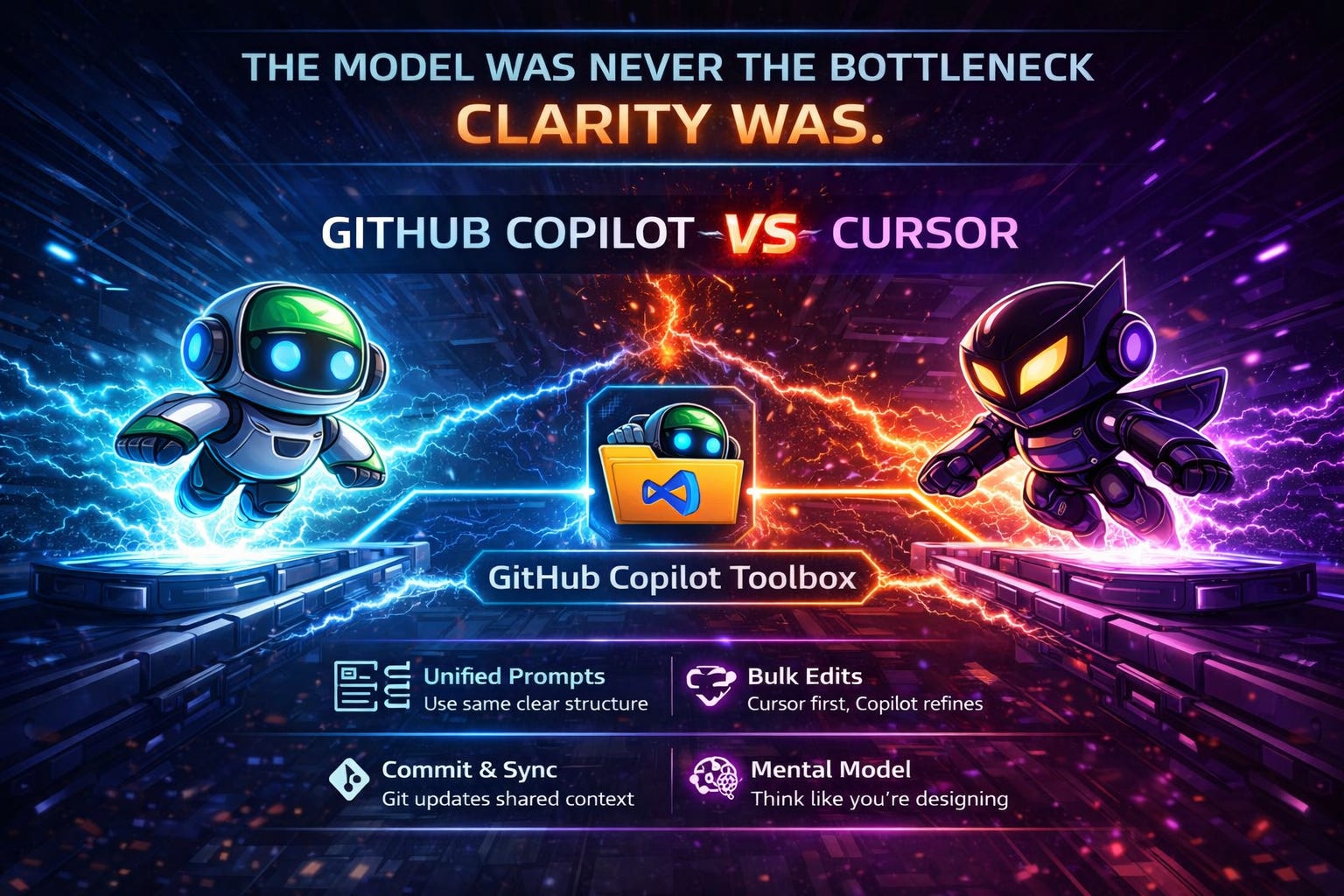
The model was never the bottleneck. Clarity was.
I lead teams by removing ambiguity.
I still love to code. To me, servant leadership means removing ambiguity, building the runway, and helping teams move faster with clarity.
I’ve spent real time in Cursor and in Visual Studio Code with GitHub Copilot. Both are strong but the friction is real. They don’t share configuration, so aligning them takes deliberate effort. In VS Code, Copilot could be active while my Cursor-shaped setup lived somewhere else on disk.
That left me with two bad options:
Ignore it and accept generic outputs, or Manually reconcile everything until disk and memory drift apart and the next session starts cold.
I stopped treating it like a choice between tools and started treating it like a systems problem. That’s what led me to bridge the gap with GitHub Copilot Toolbox.
TL;DR
This blog is for anyone who splits time between Cursor and Visual Studio Code with GitHub Copilot: same code, but different places and shapes for “how the AI is set up.”
In one sentence: Move between Cursor and VS Code + Copilot without starting over: automate the boring file translation, use GitHub Copilot Toolbox for day-to-day, and keep memory and project rules in version control so the thread survives the next chat.
Why this matters
Formats drift. Cursor and VS Code + Copilot do not use the same config files. Treat that as something you can migrate on purpose, not a fight over which product “wins.”
Two editors should not mean two truths. Small bridges keep one story on disk; you still pick the right surface for the job.
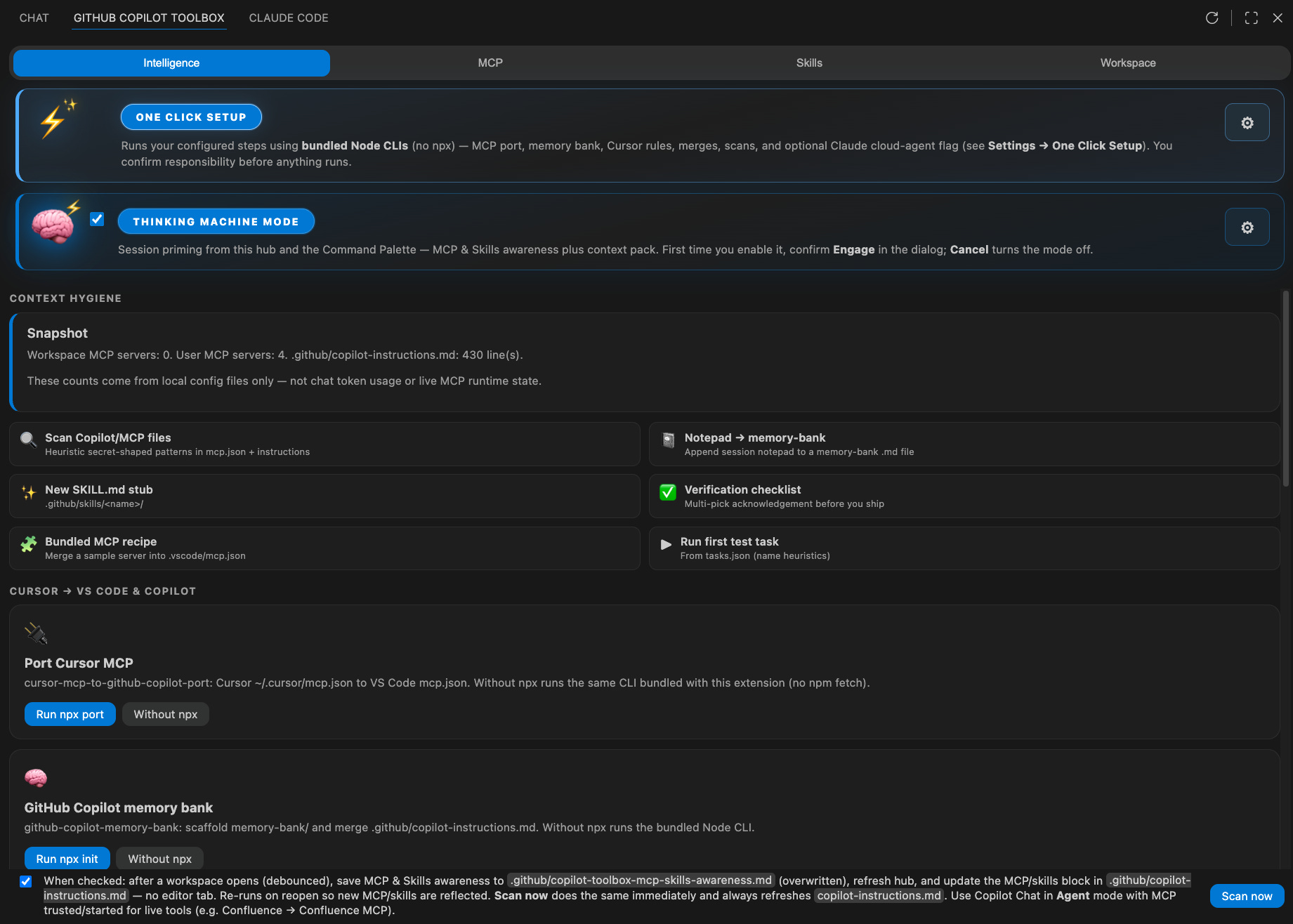
One place for Copilot-related setup: A dedicated Copilot Toolbox in VS Code for developers to:
Move from Cursor to Copilot in fewer steps: one-click-style actions to port MCP, cursor rules and scaffold a memory bank.
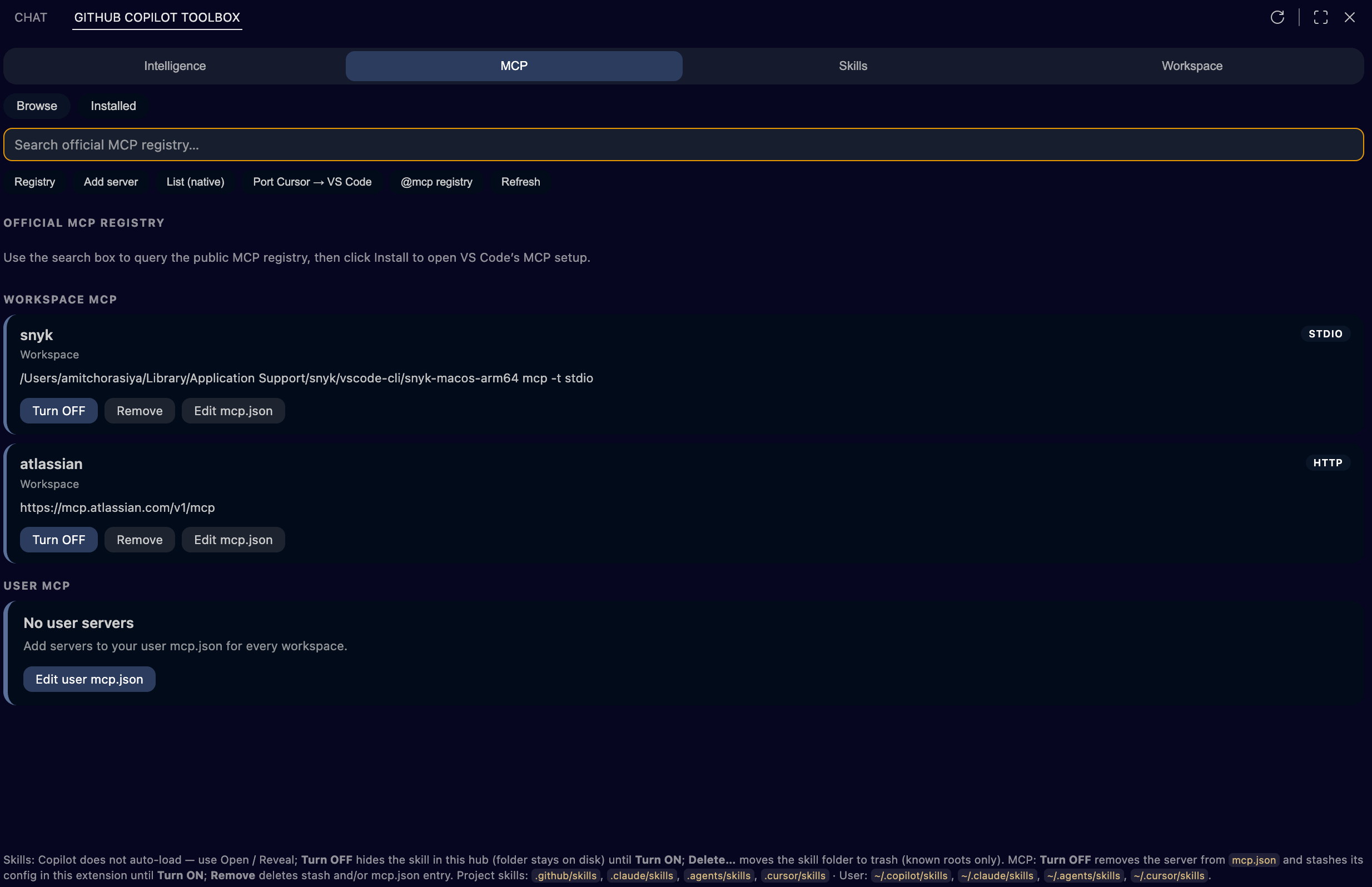
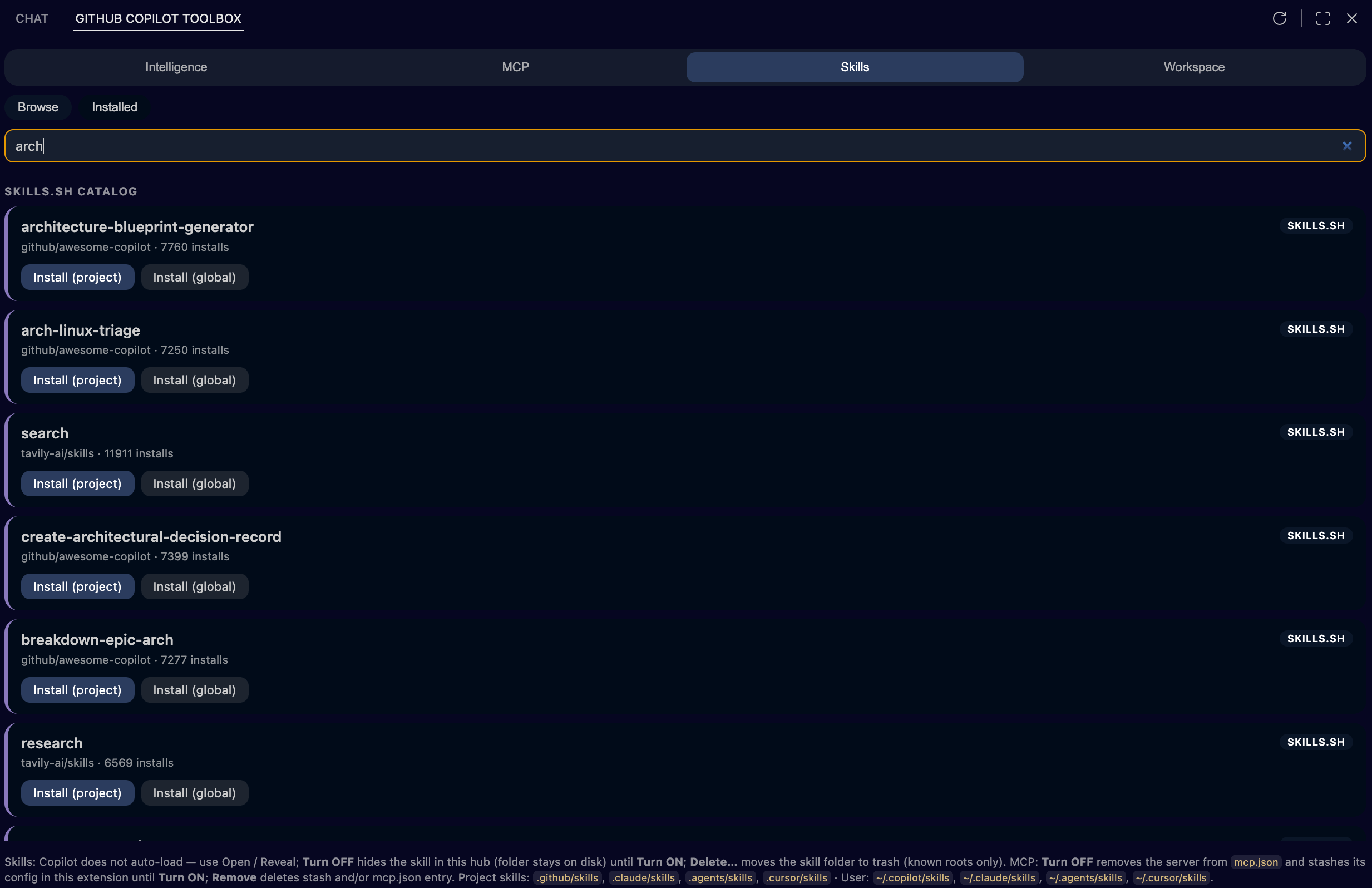
Search and add MCP servers and Agent Skills: browse the MCP registry and skills catalog from the hub, see what’s already installed, and add Agent Skills/MCP without digging through JSON by hand.
See what’s really configured — a clear view of workspace vs user MCP, local skill folders, and a workspace kit checklist (rules, instructions, mcp, skills, memory bank) so the repo matches what you think you shipped.
Ship structured, privacy-aware context into Copilot Chat — Intelligence context packs and readiness flows help teams gather the right slices (with explicit choices like git/diagnostics), paste into Chat, and stay aligned on what Copilot can see.
What I actually think
GitHub Copilot Toolbox is not a Copilot replacement. It is the unified toolbox: what is configured, where it lives, and actions that run the bridges without living in the command palette.
This matters most when a repo still has Cursor-era files and I am doing serious work in VS Code + Copilot.
Cursor when I am in Cursor end-to-end for a stretch.
VS Code + Copilot + Toolbox when I want MCP, instructions, and checklist in one place in the Microsoft stack.
The CLIs in CI, scripts, or a one-off.
What it includes (at a glance)
MCP: Browse workspace and user MCP, registry search, port from Cursor via
npx, install flows aligned with VS Code.Intelligence: Cursor → VS Code & Copilot bridge cards (MCP port, memory bank, rules → Copilot instructions), context pack for Chat, readiness checks, optional awareness merge into
.github/copilot-instructions.md.Workspace kit: Checklist for
.cursor/rules,.cursorrules,memory-bank/,.github/copilot-instructions.md,.vscode/mcp.json, plus open/reveal and wizard-style flows.Skills: Catalog and installed SKILL.md trees: open and reveal on disk (Copilot does not auto-load every skill without clear instructions; the UI says that plainly).
Guide & tools: Reference, session notepad, env checklist, shortcuts such as Ctrl+Alt+K / Cmd+Alt+K for inline chat proxy, helpers for
.cursorrulesand instructions.
What I will not automate away
Priorities, trust, and sign-off stay human. If I kept pasting server lists into chat instead of fixing what lives in files, the bottleneck was integration and documentation, not “smarter tokens.” Stabilize the on-disk configuration first.
Start here: GitHub Copilot Toolbox on the Marketplace → Copilot Toolbox → Intelligence. Settings prefix GitHubCopilotToolBox.*.
For builders: repos and file paths
Repositories:
Github-Copilot-Cursor-MCP-Port: cursor-mcp-to-github-copilot-port
Github-Copilot-Cursor-Rules-Converter: cursor-rules-to-github-copilot
Github-Copilot-Memory-Bank: github-copilot-memory-bank init
Github-Copilot-ToolBox: VS Code extension; Marketplace AmitChorasiya.github-copilot-toolbox
Where Cursor and Copilot disagree
MCP
Cursor / disk:
~/.cursor/mcp.json,mcpServersCopilot / VS Code: Workspace or user
mcp.json,servers
Rules
Cursor / disk:
.cursor/rulesCopilot / VS Code: Generated instructions under
.github/
Skills
Cursor / disk:
SKILL.mdtreesCopilot / VS Code: Value on disk; tooling helps discovery
Memory
Cursor / disk: mature memory bank
Copilot / VS Code: proper memory bank didn’t exists, yet!
Closing
Cursor expressed intent on disk in formats A, B, and C. VS Code and Copilot wanted X, Y, and Z. I built dedicated bridges for each mismatch, then wrapped them in Github-Copilot-ToolBox so the migration is a command and a sidebar, not a weekend archaeology project.
And if you made it this far, thank you. Genuinely. Go build something. I love you for even trying.
This is my attempt to give back to the countless people who helped me learn, most of whom don’t know I exist.